‘Help Me Edit’ AI Feature Rolls Out in India – Edit Photos Just by Asking
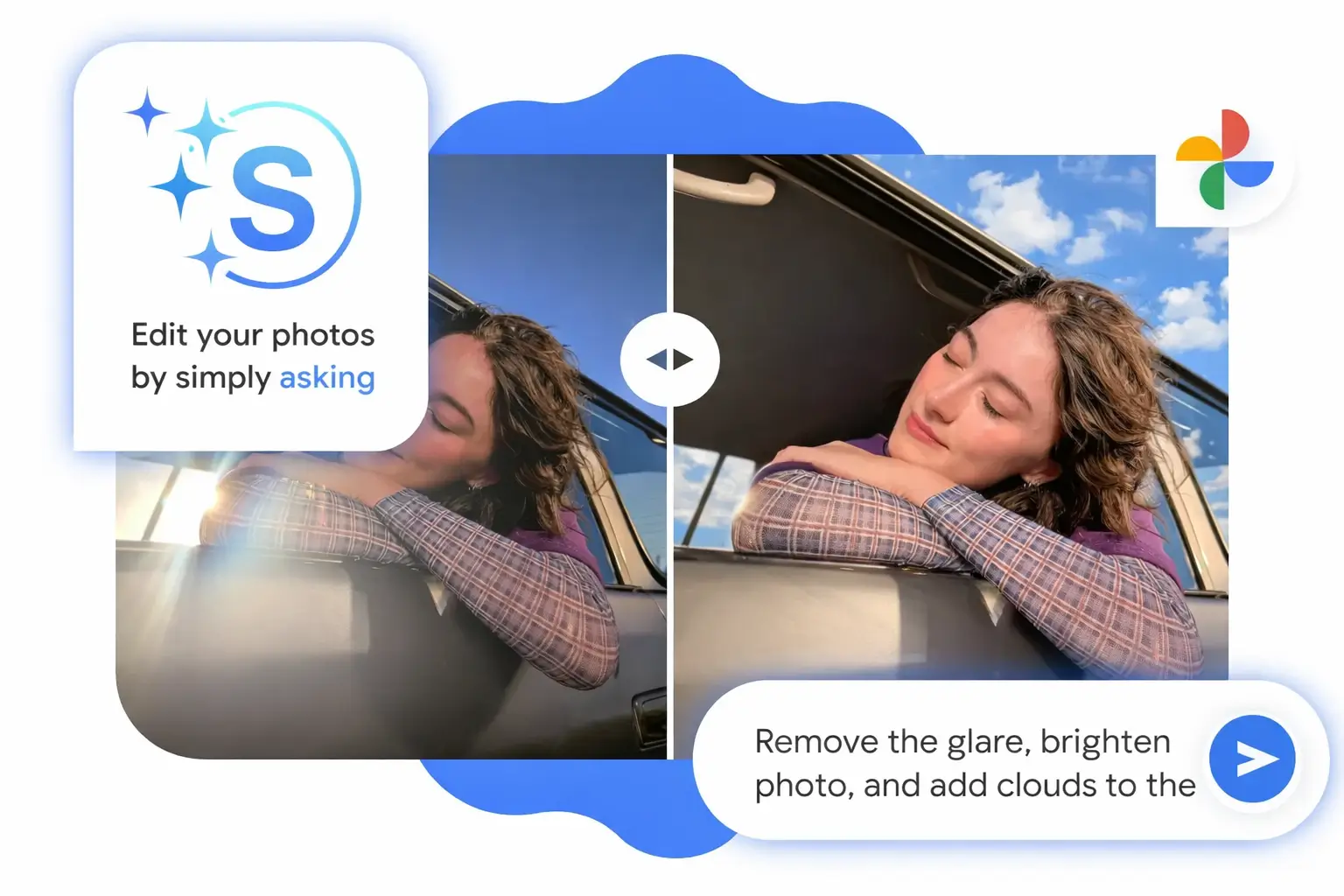
Photo editing has always felt like extra work. You click a beautiful photo during a wedding, festival, or trip, but something feels off. The lighting is dull, the background is messy, or someone ruins the shot by walking into the frame. Fixing these small issues usually means opening complex editing tools, adjusting sliders, and spending a lot of time just to get one photo right.
Now imagine fixing all of this by simply typing a sentence.
That is exactly what Google Photos Help Me Edit feature brings to users in India.
Rolled out in January 2026 and powered by Gemini AI, this new feature allows anyone to edit photos using natural language. You do not need editing skills, experience, or premium software. You just tell Google Photos what you want, and the AI does the work for you.
This guide explains everything you need to know about the Google Photos Help Me Edit feature in India, including how it works, who can use it, supported phones, step by step usage, real life examples, tips for best results, privacy details, and why this feature is a major milestone for AI photo editing in India.
What Is Google Photos Help Me Edit?
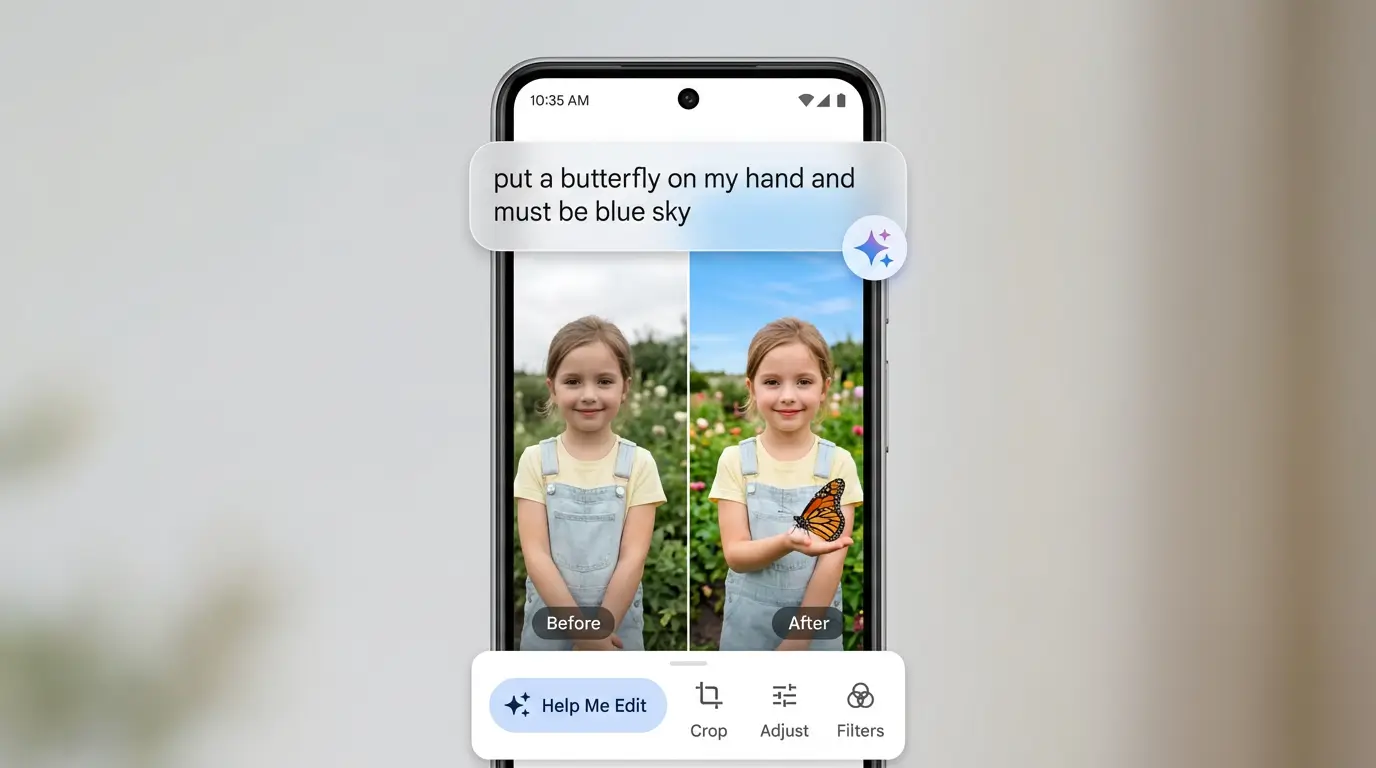
Help Me Edit is an AI powered photo editing feature built directly into the Google Photos app. It allows users to edit images using simple text or voice instructions instead of manual editing tools.
You open a photo, tap Help Me Edit, and describe the change you want. For example
Make the background brighter
Add flowers
Improve lighting
Remove the person behind me
Make the sky blue
Gemini AI understands your request and creates multiple edited versions of the photo within seconds.
This feature uses Google Gemini AI along with advanced image styling technology to deliver realistic and visually pleasing results. It feels less like using software and more like talking to a professional photo editor.
Why Google Photos Help Me Edit Matters So Much in India
India is one of the most photo heavy countries in the world. People capture photos for festivals, weddings, family events, food, travel, and social media almost daily.
However, most users are not comfortable with professional editing apps. Many people find them confusing, time consuming, or too technical.
Help Me Edit changes this completely.
It removes the learning curve and replaces it with conversation. Anyone who can speak or type a sentence can now edit photos professionally.
Another huge reason this feature works so well in India is language accessibility. Google has included support for multiple Indian languages, allowing users to give editing instructions in their preferred language.
This makes AI photo editing inclusive, practical, and widely usable across urban and rural users.
How Gemini AI Powers Help Me Edit
At the heart of this feature is Google Gemini AI, one of Google’s most advanced artificial intelligence models.
Gemini AI understands natural language and visual context together. When you describe an edit, it analyzes the photo and your instruction at the same time. It then applies intelligent changes that look realistic rather than artificial.
For example
If you say make it sunny, Gemini adjusts lighting, shadows, and color balance
If you say add flowers, it matches perspective and depth
If you say remove a person, it fills the background naturally
This level of understanding is what makes Help Me Edit feel smart rather than robotic.
Edit your photos just by asking — now starting to roll out in India, Japan, and Australia! 🌏✨
— Google Photos (@googlephotos) January 27, 2026
Complex editing tools just became a whole lot simpler. Just tap “Help me edit”, tell Google Photos what you want to change, and watch your vision come to life 🖼️
Rolling out now to… pic.twitter.com/vmYkvYoqIz
Who Can Use Help Me Edit in Google Photos?
Google has made this feature accessible to a wide audience in India.
You are eligible if
You are 18 years or older
You use an Android phone or tablet
Your Google Photos app is updated
The feature has reached your device through rollout
The rollout is gradual, meaning some users may see it immediately while others may need to wait a short time.
Earlier AI editing tools were limited to Pixel phones in certain countries. This time, Google has opened Help Me Edit to most Android users in India, making it far more inclusive.
If you are under 18 or using an iPhone, you may need to wait for future updates.
Supported Android Phones and Requirements
You do not need a flagship or expensive phone to use Help Me Edit.
The minimum requirements are
Android 8.0 or higher
At least 4 GB RAM
Latest version of Google Photos
This means most phones released in the last five to six years are supported.
Popular brands like Samsung, OnePlus, Xiaomi, Realme, Vivo, Oppo, Motorola, Nokia, and others are fully compatible.
If you do not see the feature yet, update Google Photos from the Play Store and check again. The rollout started in late January 2026 and continues to expand.
Step by Step Guide to Use Edit in Google Photos
Using Help Me Edit is simple enough for beginners and even older users.
Step one
Open the Google Photos app on your Android phone and sign in with your Google account.
Step two
Select the photo you want to edit from your library or albums.
Step three
Tap the Edit option at the bottom of the screen.
Step four
Find and tap the Help Me Edit option inside the editing screen.
Step five
Describe what you want to change using simple words. You can type or speak your request.
Examples
Make it brighter and add flowers
Improve lighting and skin tone
Remove the person in the background
Make the sky blue
Step six
Wait a few seconds while Gemini AI generates edited versions.
Step seven
Swipe through the results and choose the one you like best.
Step eight
Tap Save or Save copy to keep your original photo safe.
That is it. No sliders, no manual adjustments, and no confusion.
Language Support Makes It Truly Indian Friendly
One of the strongest advantages of Help Me Edit in India is its support for Indian languages.
Users can give editing commands in languages like
Hindi
Tamil
Telugu
Marathi
Bengali
Gujarati
This allows people to edit photos without worrying about technical English terms. Voice input works especially well for regional languages, making the experience natural and comfortable.
This approach reflects Google’s focus on local users and real world usability.
Real Life Examples of What You Can Do
Help Me Edit is powerful enough to handle both basic fixes and creative transformations.
For portrait photos taken indoors, you can brighten lighting and add a scenic background.
For group photos, you can fix blinking eyes or improve facial expressions.
For travel photos, you can remove crowds or replace backgrounds with mountains or beaches.
For festival photos, you can enhance lighting and colors to match the festive mood.
For creative edits, you can turn a photo into a painting style or cinematic look.
This makes the tool useful for casual users, social media creators, and even small businesses.
Google Photos Help Me Edit Feature in India Using Gemini AI
— Veo Prompt (@VeoPrompt) January 28, 2026
Edit photos by typing what you want. Google Photos Help Me Edit powered by Gemini AI is rolling out in India. Full step by step guide.
Here is Step by Step: https://t.co/wkwlZnvhM8 pic.twitter.com/MuUuaNSOGd
Tips to Get the Best Results with Gemini AI
To get natural looking edits, follow these simple tips.
Be specific but simple with instructions
Use voice input whenever possible
Try multiple variations of commands
Always review all AI generated options
Save edits as a copy
Give feedback to improve results
AI editing improves over time, and your feedback helps refine future updates.
Privacy and Safety of Your Photos
Google has emphasized privacy and data protection.
Your photos remain private and are processed securely. Personalized edits use private face grouping features that are not shared publicly.
Edited photos may include indicators showing AI involvement for transparency.
Your data is not shared without permission, ensuring your memories stay safe.
Is Help Me Edit Free in Google Photos?
Yes. The basic Help Me Edit feature is free to use.
You do not need a Google One subscription or premium plan for standard AI photo edits.
Future advanced features may have limits, but everyday users can enjoy powerful AI editing at no cost.
Why Help Me Edit Is the Future of Photo Editing
Help Me Edit represents a shift from tool based editing to conversation based editing.
Instead of learning how software works, users simply express what they want.
This approach saves time, reduces frustration, and makes creativity accessible to everyone.
For India, where smartphones are widely used but editing skills vary, this feature is perfectly timed.
Final Thoughts: A New Chapter for Google Photos in India
The Google Photos Help Me Edit feature in India is more than just a new tool. It is a complete change in how people interact with photos.
Powered by Gemini AI, it turns photo editing into a simple conversation and removes technical barriers for millions of users.
If you are an Android user above 18, update your Google Photos app and start exploring Help Me Edit today.
This 2026 rollout is only the beginning. As AI improves, photo editing will become even smarter, faster, and more personal.
About the Author