What’s New in ChatGPT: Exciting New Features and Updates
What’s New in ChatGPT: Important Updates on the macOS App—Please read carefully.
- Exciting Canvas Features Unveiled
The latest updates to ChatGPT have introduced groundbreaking features, with Canvas taking center stage. This dynamic tool is now available for all users—both Free and Pro—bringing an unprecedented level of interactivity and functionality to your ChatGPT experience. If you’ve been curious about what’s fresh and exciting, here’s a detailed look at the new Canvas capabilities and why they matter.
1. Canvas for All Users
As of December 10, 2024, Canvas is now accessible by default in GPT-4.0 for every user. Whether you’re a Free-tier user exploring AI or a Pro subscriber maximizing productivity, Canvas is here to revolutionize how you interact with ChatGPT.
- Why it’s a Big Deal?
Canvas provides a structured space where you can write, edit, and collaborate on long-form documents or code seamlessly. It’s more than just a chat—it’s a workspace designed for your creativity and efficiency.
2. Canvas in GPTs
For those leveraging GPTs (customized AI bots), Canvas is now fully integrated. When enabled in the GPT creator, it becomes the default for newly created GPTs. This ensures that any custom GPT can use the powerful features of Canvas effortlessly.
- Work on projects directly within your GPT’s environment.
- Switch between chat and document-style editing without losing focus.
3. Python Code Execution in Canvas
Calling all coders! The new update allows you to execute Python code directly in Canvas. Whether you’re testing scripts, debugging errors, or building something entirely new, this feature makes Canvas a coding powerhouse.
- What’s Included
- ChatGPT can now identify and fix bugs in your Python code.
- Receive comments on errors, making debugging faster and more efficient.
- Save time by running code in real-time, without switching tools.
4. Canvas Shortcut
One of the most user-friendly additions is the Canvas shortcut. Now, you can paste content into ChatGPT and instantly open it in Canvas with a simple click. This shortcut, located in the upper-right corner of the composer, makes switching to Canvas smoother than ever.
- Example Use Cases
- Paste lengthy drafts or code snippets and edit them instantly in Canvas.
- Save time by eliminating manual transfers between tools.
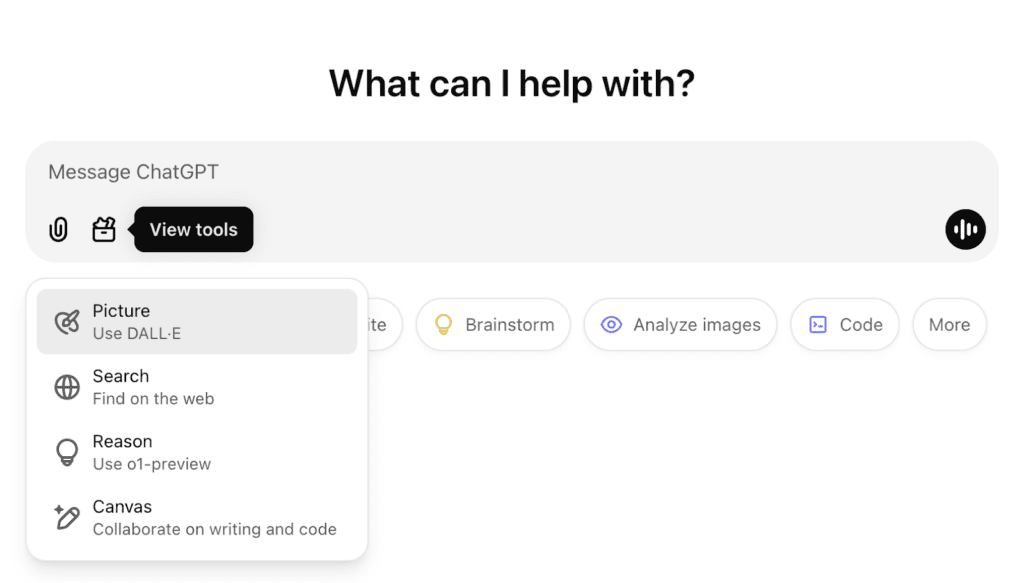
5. Canvas in the Toolbox
Canvas has also been added to the Toolbox, making it an even more integral part of the ChatGPT experience. Whether you’re brainstorming ideas, crafting blog posts, or analyzing data, having Canvas readily available ensures a seamless workflow.
- Why You’ll Love It
- Centralized access to Canvas alongside other tools.
- Versatile utility for writers, developers, and professionals alike.
Why These Features Are Game-Changers
The latest enhancements to Canvas aren’t just incremental updates—they’re transformative. By combining text-based interaction with the versatility of a workspace, ChatGPT has bridged the gap between chat and productivity. Here’s why these features stand out:
- For Developers: The ability to run Python code directly in Canvas simplifies coding, debugging, and learning.
- For Writers: The structured environment of Canvas offers a distraction-free space for creating long-form content.
- For Professionals: From brainstorming sessions to collaborative edits, Canvas enables real-time efficiency.
How to Use the New Canvas Features
- Here’s how you can make the most of the new Canvas capabilities
- Access Canvas: Available by default in GPT-4 for all users.
- Enable in GPTs: Toggle it on while creating or editing custom GPTs.
- Use the Shortcut: Paste content and open Canvas instantly via the shortcut.
- Run Python Code: Test scripts or debug issues directly in Canvas without leaving the interface.
What’s Next for ChatGPT?
With every update, OpenAI demonstrates a commitment to enhancing productivity and user experience. The Canvas features are a glimpse into the future of AI-Powered tools—a future where interaction, creativity, and efficiency coexist seamlessly.
Ready to explore the full potential of ChatGPT’s Canvas? Dive in today and redefine the way you work, code, and create.
In-Depth Feature Comparison
| Feature | Old Features | New Features |
|---|---|---|
| Text Completion | ✔ | ✔ |
| Summarization | ✔ | ✔ |
| Conversational AI | ✔ | ✔ |
| Code Generation | ✔ | ✔ |
| Multi-language Support | ✔ | ✔ |
| Basic Plugins | ✔ | ✔ |
| Web Searching ("Find on Web") | – | ✔ |
| Enhanced Canvas Tools | – | ✔ |
About the Author